
By Gyan Architects
GYAN
PMS
A complete project management system, built in-house by Gyan Architects from years of real project experience. It brings drawings, approvals, materials, billing and communication together in one organised, searchable platform, from first submission to final record.
Available on Android, iOS, Desktop and Web.
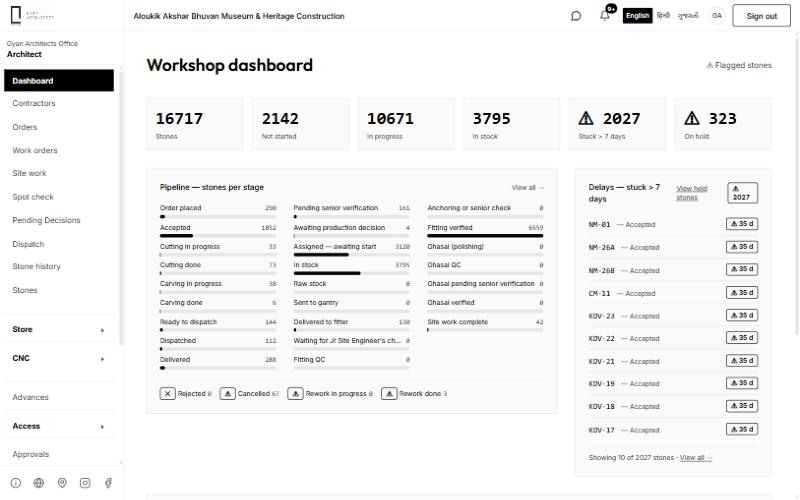
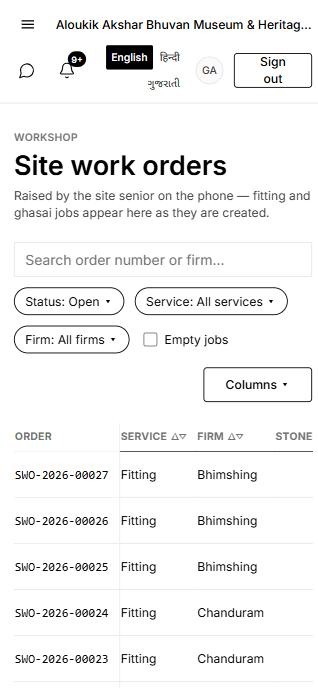
Built by Gyan Architects
01
Fully customised
Designed around the way our studio actually works. Every screen, step and approval follows our own workflow rather than a generic, off-the-shelf template.
02
Fewer mistakes
A structured, step-by-step process with clear checks and approvals reduces errors and rework, while built-in chat and calls keep every conversation inside the project and free of miscommunication.
03
Everything archived on time
From drawing to final bill, every record is archived on time and stays organised, so any document or decision can be found in moments.
Modules in GYAN PMS
01
Materials and components
Track every material and component by stage, from sourcing and fabrication to finishing and installation, on projects of any scale.
02
Orders
Place and follow orders with suppliers and contractors from request to delivery.
03
Work orders
Issue work orders to contractors and teams and see their status in one list.
04
Site work
Work done and issues are recorded on site from the phone.
05
Spot check
Inspect materials and work on the spot and record the result against the item.
06
Dispatch
Record what leaves the workshop or yard and what reaches the site.
07
Store
Keep stock, issues and returns with a clear trail across every store.
08
CNC and fabrication
Machines, cutting and carving or fabrication queues, with work assigned to each machine.
09
Billing and transport bills
Bills and transport bills move through checking, carrying and accounts.
10
Worker time
Record attendance and hours for workers on site and in the workshop.
11
Daily reports
Daily reports from site and workshop collected in one place.
12
Advances
Record and settle advances given to contractors and workers.
13
Approvals
Requests wait for approval inside the app and move on once approved.
14
Chat
Personal and group chat with phone and video calls inside the app.
15
Drawings and revisions
Submit, check and approve drawings with a full revision history for every sheet.
16
Material selection
Shortlist, compare and finalise materials and samples against each drawing.
17
Contractors and vendors
Keep contractor and vendor records, capacity, orders, payments and performance together.
18
Documents and archive
Every drawing, bill, report and approval is archived and easy to find, project after project.
Communication
Chat with voice and video calls
Personal chat
Message any team member directly, with the full conversation kept alongside the work.
Group chat
Bring a whole team into one conversation for a project, a site or a task.
Phone call
Start a voice call from any chat without leaving the app.
Video call
Walk through a drawing, a material or the site together on a video call.
Want it on
your project?
Leave your name and number. We will call to understand your project and set up the app for it.